import datetime
import pickle

import pystac_client
import shapely
from shapely.ops import transform
from pyproj import TransformerAccessing Satellite Time-series on CDSE
Python
CDSE
Sentinel-2
Time-series
odc-stac
Sentinel Hub
OpenEO
xcube
virtualizarr
Benchmarking libraries to get Sentinel-2 time-series from CDSE. Testing odc-stac, Sentinel Hub, OpenEO, xcube and TLM virtualizarr

I recently have a use-case which requires long satellite time-series for somewhat small AOIs.
With all the recent advances in cloud optimized formats and the standardization of data catalogs with STAC, I thought this should be really easy.
And indeed; There’s tons of options, maybe even a bit too many to keep track of. We’ll go through them in a structured way, providing usage examples/benchmarks for all of them.
Example Use Case
For this example use case we are going to try and query 1 year of Sentinel 2 data over an AOI with 10x10km.
Let’s do some napkin math to figure out how much data that will be. To ground it in reality let’s actually query the CDSE STAC catalog.
point = shapely.geometry.Point(14.39903, 47.03920)
event = datetime.date(2022, 1, 1)
start = datetime.date(event.year - 1, event.month, event.day)
crs = "EPSG:3035"
# WGS84 -> LAEA Europe (EPSG:3035)
transformer = Transformer.from_crs("EPSG:4326", crs, always_xy=True)
point_3035 = transform(transformer.transform, point)
# 5 km square buffer -> 10x10 km box centered on the point
box_10km = point_3035.buffer(5000, cap_style="square")
bounds = box_10km.bounds
# for search:
back = Transformer.from_crs(crs, "EPSG:4326", always_xy=True)
box_4326 = transform(back.transform, box_10km)
# We'll also pickle those file for later use
# write out the geoms so they can be used by other notebooks
with open("params.pkl", "wb") as fp:
pickle.dump(
{
"start": start,
"end": event,
"point": point,
"point_3035": point_3035,
"box_3035": box_10km,
"box_4326": box_4326,
},
fp,
)URL = "https://stac.dataspace.copernicus.eu/v1"
cat = pystac_client.Client.open(URL)
cat.add_conforms_to("ITEM_SEARCH")params = {
"limit": 100,
"collections": "sentinel-2-l2a",
"datetime": f"{start.strftime('%Y-%m-%d')}/{event.strftime('%Y-%m-%d')}",
"bbox": box_4326.bounds,
"query": {"eo:cloud_cover": {"lte": 80}},
"sortby": "properties.eo:cloud_cover",
"fields": {"exclude": ["geometry"]},
}items = list(cat.search(**params).items_as_dicts())
len(items)89It’s 89 acquisitions in total for 1 year with a cloud cover of less than or equal 80%.
For this example we’ll just pretend to want to use NDMI and would like to get 3 bands: B08, B11 and SCL.
B08 is at 10m resolution, B11 and SCL at 20m resolution. For a 10x10km AOI this works out to around 276MB of uncompressed data.
Calculation details
So if we could only get exactly the data amount we need directly from the server we would need to transfer:
At 10m resolution (B08):
\(1000px * 1000px * 92time * 16 bit = 184 MB\)
At 20m resolution (B11, SCL):
\(500px * 500px * 92time * 16 bit = 46 MB\)
\(2 * 46 + 184 = 276MB\)
At the maximum 20MB/s download speed that Creodias S3 provides, this should only take a few seconds. Let’s see how long it actually takes.
Results
| Type | Library | Approach | Time | Catalog Query / Lazy cube init |
|---|---|---|---|---|
| Hosted | Sentinel Hub | Download Client | 00m 28s | 2s |
| Zarr Wrapper | 00m 23s | - | ||
| OpenEO | Synchronous | 08m 58s | - | |
| Batch Job | 13m 53s | - | ||
| Local | odc-stac | Single thread | 19m 16s | 2s |
| Multi-threaded | 08m 03s | 2s | ||
| xcube | Multi-threaded | 25m 01s | 3m 8s | |
| Multi-core | 08m 47s | 3m 8s | ||
| Native UTM, Threaded | 17m 50s¹ | 25s | ||
| JP2 TLM Virtualizarr | Multithreaded | 01m 30s | 8s² |
¹ only queried 48 acquisitions for some reason
² not including pre-computing/downloading TLM headers
From these results we can see that Sentinel Hub is by far the fastest option to get the full data cube. The fastest local option is the JP2 TLM Virtualizarr, this however is not an operational option (see details below).
The biggest disappointment is xcube: It takes very long to intitialize even the lazy cube, and does not seem to be set up for dask multi-threading, taking as long as the odc single threaded approach.
But why is everything else so slow?
The devil (details)
There’s a few complications we are glossing over which can add a lot of overhead. To understand them we first need to understand how Sentinel-2 data is provided by CDSE. We’ll be talking about tiles, blocks and what we need to do to get those blocks. First a high level visual overview. We’ll go into detail for each level below.
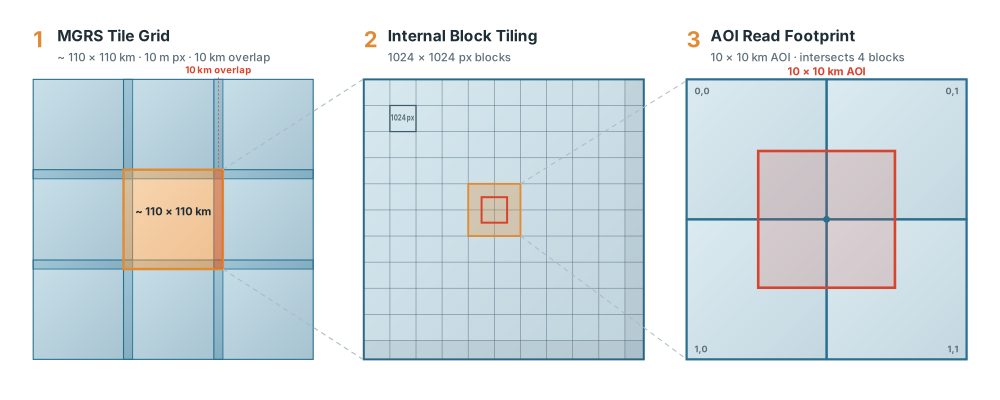
The largest level of tiling which Sentinel-2 provides is the MGRS tiles. These are 110x110km in size, with around 10km of overlap between tiles (this can be more or less depending on latitude and longitude). This leads us to:
Complication 1: Multiple tiles
If the WGS84 bounding box of your AOI is less than around 10x10km it most often fits within a single tile. If it is larger, it can happen that multiple tiles need to be queried, mosaiced and possibly also reprojected if your AOI crosses UTM Zones.
For these MGRS tiles Sentinel 2 data on CDSE is saved in a .SAFE format. The .SAFE format provides metadata of the acquisition and each spectral band as it’s own JP2 file. A JP2 file is short for JPEG2000 and is a file type which in theory supports chunked random reads similar to a Cloud Optimized GeoTIFF (COG). In case of Sentinel-2 the bands with 10m resolution have a blocksize of 1024x1024 pixels. This means that you can get subsets of data from the full S2 tile in pre-defined 1024x1024 chunks. This is a great advantage. You don’t need to get the entire tile, but only smaller subsets. However it also brings us to our next complication:
Complication 2: Multiple Blocks
We have a AOI with 1000x1000 pixels, just slightly below the block size. This means that unless we got extremely lucky and our AOI perfectly lands within a single block, we actually have to get 2 or most likely 4 blocks at 10m resolution to get all the data for our full AOI. So the calculated 184 MB of data quickly becomes 4*184 MB = 763 MB. Almost a full Gigabyte. And this is for each 10m band we need to get.
Complication 3: Number of requests
Sentinel-2 Files are separate per band. This means we need to send at least one request per band. In reality we need to send a request for the header of the file to first learn where each block begins in the file, and can then issue separate range requests to get the data subsets. In even more reality most of the Sentinel-2 archive does not provide the necessary headers for the data (see here for some analysis) meaning that we need a lot more requests to first learn about the structure of the data before we can actually get to querying.
This whole process is heavily IO bound. You are always waiting for a request to complete or for data to be transmitted. Smart multi-threading can speed this up a lot, since data from multiple bands and acquisitions can be requested and transmitted in parallel while waiting for responses or data from already sent requests.
However the CDSE S3 service has a limit of 2000 requests/minute. In our case since we need to learn the structure of each file first due to the missing headers, around 100 range requests have to be sent per file. With a limit of 2000 requests per minute this means that local options can not query data any faster than the ~8 minutes which odc-stac achieve.
This is the great advantage that the JP2-TLM solution has. It uses pre-computed headers and thus does not send as many requests, does not get rate limited and completes a lot faster. This is however very experimental and not at all production ready. However it would be by far the best option to query streamlined Sentinel-2 data directly from S3.
Direct Access vs Hosted Services
All of this is most relevant when collecting your datacube directly from the data on a remote S3 bucket. Libraries which do it in this way are:
- odc-stac
- stackstac
- xcube-stac
All of these options only rely on a STAC catalog and a file server.
There is another option. CDSE also provides hosted services. These are services running on computing infrastructure in the same datacenter as where the Sentinel data is hosted. These services have the big advantage that they are a lot closer to the data than we are. Requests for data are handled entirely within the datacenter. This means that more bandwidth is available and requests complete faster.
The two hosted services available are:
- SentinelHub
- openEO
These services can assemble the finished datacube entirely within the datacenter, carrying out reprojection and mosaicing for you. Data from extra blocks which aren’t needed can be already discarded on the server and only the finished datacube can be sent to you. If the hosted service is efficient in doing this, it should be faster than compiling the data cube through direct access.
The disadvantage is that this pre-processing on the server has a cost. Because of this cost resources are limited per month. SentinelHub offers 20.000 Processing Units per month and 10.000 Credits for openEO for free users. How far this gets you depends on the amount of requested data.
For these hosted services the absolute best way to use them is to implement your entire workflow to run on the cloud. However for fast prototyping, having the data local is often much quicker.